

[Jan-2026] 100% Actual DEA-C02 dumps Q&As with Explanations Verified & Correct Answers
DEA-C02 Dumps with Free 365 Days Update Fast Exam Updates
NEW QUESTION # 102
A Snowflake data warehouse contains a table named 'SALES TRANSACTIONS' with the following columns: 'TRANSACTION ID', 'PRODUCT D', 'CUSTOMER D', 'TRANSACTION DATE, and 'SALES AMOUNT'. You need to optimize a query that calculates the total sales amount per product for a given month. The 'SALES TRANSACTIONS' table is very large (billions of rows), and queries are slow. Given the following initial query: SELECT PRODUCT ID, SUM(SALES AMOUNT) AS TOTAL SALES FROM SALES TRANSACTIONS WHERE TRANSACTION DATE BETWEEN '2023-01-07' AND '2023-01-31' GäOUP BY PRODUCT ID; Which of the following actions, when combined, would MOST effectively improve the performance of this query?
- A. Create a temporary table with the results of the query and query that table instead.
- B. Convert the column to a VARCHAR data type.
- C. Increase the virtual warehouse size to the largest available size.
- D. Create a materialized view that pre-aggregates the total sales amount per product and month.
- E. Create a clustering key on 'PRODUCT_ID and 'TRANSACTION_DATE columns in the 'SALES_TRANSACTIONS' table.
Answer: D,E
Explanation:
Creating a clustering key on 'PRODUCT ID and 'TRANSACTION DATE' allows Snowflake to efficiently prune micro-partitions based on the date range filter, and then quickly group by "PRODUCT_ID. A materialized view pre-aggregates the data, significantly reducing the amount of computation required at query time. While increasing the warehouse size might provide some improvement, it is not the most efficient solution. Converting 'TRANSACTION_DATE to VARCHAR is detrimental. Using a temporary table is not necessarily an optimization.
NEW QUESTION # 103
Consider the following scenario: You have a Snowflake task that refreshes a materialized view. The materialized view is based on a large base table that is constantly being updated. The refresh operation is taking longer than expected, impacting downstream reporting. Which of the following actions will likely NOT improve the performance of the materialized view refresh?
- A. Analyzing the Query Profile of the Materialized View Refresh query to identify Bottlenecks and Optimization areas.
- B. Adding more columns to the materialized view, even if they are not immediately required for reporting.
- C. Increasing the warehouse size used by the task executing the refresh.
- D. Using the 'AUTO_REFRESH' property of the materialized view when appropriate and feasible.
- E. Ensuring the base table used by the materialized view has an appropriate clustering key.
Answer: B
Explanation:
Adding more columns to the materialized view (Option C) will generally worsen the performance of refresh operations, as it increases the amount of data that needs to be processed and stored. The materialized view only needs the minimal set of columns required by its query. All other options will likely improve performance or provide data to improve performance. Option A allows for more resources to be used during the refresh. Option B reduces the amount of data that needs to be scanned. Option D automates the refresh process, making it more efficient overall and leverages Snowflake's automatic refresh optimization. Option E: by analyzing the query profile, data engineers can uncover specific areas for improvement within the query execution plan.
NEW QUESTION # 104
You have a large dataset stored in AWS S3 in Parquet format. The data is constantly updated by an external process, but you need to run read-only analytical queries against the most current data in Snowflake without ingesting it. Which approach is the MOST efficient and cost-effective way to achieve this, considering minimal latency for query results?
- A. Create a Snowflake internal stage, load the Parquet files into the stage periodically, and create a table from the staged files.
- B. Create a Snowflake external table pointing to the S3 location. Manually refresh the external table metadata periodically using the 'ALTER EXTERNAL TABLE REFRESH' command.
- C. Create an external table in Snowflake pointing to the S3 location. Configure automatic data refresh using the 'AUTO REFRESH' parameter and a notification integration.
- D. Use Snowpipe to continuously ingest the Parquet files from S3 into a Snowflake table.
- E. Create a view on top of the S3 files using a custom Java UDF to read Parquet data directly. Then, query the view.
Answer: C
Explanation:
Option B is the most efficient. External tables allow querying data directly from S3 without ingestion. 'AUTO_REFRESH' and notification integration ensures the metadata is automatically updated when new files are added to S3, providing near real-time access. Options A and D involve data ingestion, which adds latency and storage costs. Option C requires manual intervention, and Option E using a Java UDF for Parquet reading is inefficient.
NEW QUESTION # 105
A data engineering team is building a real-time fraud detection system. They have a large 'TRANSACTIONS table that grows rapidly. They need to calculate the average transaction amount per merchant daily. The following query is used:
This query is run every hour and is performance-critical. Which of the following materialized view definitions would provide the BEST performance improvement, considering the need for near real-time data and minimal latency?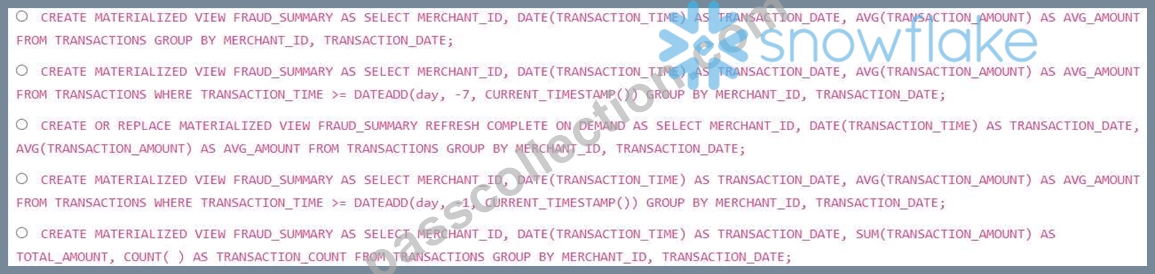
- A. Option B
- B. Option D
- C. Option A
- D. Option E
- E. Option C
Answer: C
Explanation:
Option A provides the best performance because it pre-computes the aggregation for all time, allowing Snowflake to rewrite the query. Option B adds a WHERE clause that limits the data, negating the benefits of materialized view rewrite. Option C using 'REFRESH COMPLETE ON DEMAND is not ideal for near real-time requirements. Option D filters based on a very short time period and not aligned with original problem where the window is 7 days. Option E calculates SUM and COUNT instead of AVG, doesn't match required output.
NEW QUESTION # 106
You have a large Snowflake table 'WEB EVENTS that stores website event data'. This table is clustered on the 'EVENT TIMESTAMP column. You've noticed that certain queries filtering on a specific 'USER ID' are slow, even though 'EVENT TIMESTAMP clustering should be helping. You decide to investigate further Which of the following actions would be MOST effective in diagnosing whether the clustering on 'EVENT TIMESTAMP is actually benefiting these slow queries?
- A. Run 'SYSTEM$ESTIMATE QUERY COST to estimate the query cost to see if the clustering is impacting the cost.
- B. Execute 'SHOW TABLES' and check the 'clustering_key' column to ensure that the table is indeed clustered on 'EVENT _ TIMESTAMP'.
- C. Run ' EXPLAIN' on the slow query and examine the 'partitionsTotal' and 'partitionsScanned' values. A significant difference indicates effective clustering.
- D. Query the 'QUERY_HISTORY view to see the execution time of the slow query and compare it to the average execution time of similar queries without a 'USER filter.
- E. Use the SYSTEM$CLUSTERING_INFORMATIOW function to get the 'average_overlaps' for the table and 'EVENT_TIMESTAMP' column. A low value indicates good clustering.
Answer: C
Explanation:
The ' EXPLAIN' command provides detailed information about the query execution plan. By examining the 'partitionsTotal' and 'partitionsScanned' values, you can directly see how many micro-partitions Snowflake considered vs. how many it actually scanned. A large difference suggests that the clustering is effectively pruning partitions based on the 'EVENT_TIMESTAMP' filter. While 'SYSTEM$CLUSTERING_INFORMATION' provides a general overview of clustering quality, it doesn't tell you how it's performing for a specific query. Looking at query history or checking that the clustering key is defined is useful for verifying basic setup but doesn't directly diagnose the effectiveness for slow queries.
NEW QUESTION # 107
You are using Snowpipe with an external function to transform data as it is loaded into Snowflake. The Snowpipe is configured to load data from AWS SQS and S3. You observe that some messages are not being processed by the external function, and the data is not appearing in the target table. You have verified that the Snowpipe is enabled and the SQS queue is receiving notifications. Analyze the following potential causes and select all that apply:
- A. The data being loaded into Snowflake does not conform to the expected format for the external function. Validate the structure and content of the data before loading it into Snowflake.
- B. The IAM role associated with the Snowflake stage does not have permission to invoke the external function. Verify that the role has the necessary permissions in AWS IAM.
- C. The Snowpipe configuration is missing a setting that allows the external function to access the data files in S3. Ensure that the storage integration is configured to allow access to the S3 location.
- D. The AWS Lambda function (or other external function) does not have sufficient memory or resources to process the incoming data volume, leading to function invocations being throttled and messages remaining unprocessed.
- E. The external function is experiencing timeouts or errors, causing it to reject some records. Review the external function logs and increase the timeout settings if necessary.
Answer: A,B,D,E
Explanation:
When using Snowpipe with external functions, several factors can cause messages to be dropped or unprocessed. The most common include external function errors or timeouts (A), permission issues between Snowflake and the external function (B), data format mismatches (C), and the external function lacking resources (E) leading to throttling. Option D is less likely, as the storage integration is primarily for COPY INTO and not direct Lambda function calls, assuming the Lambda function retrieves the data directly from S3 using the event data provided by SQS. The permissions issue B is still relevant as the lambda function will need access to the files in S3.
NEW QUESTION # 108
Consider the following Snowflake Javascript UDF designed to convert temperatures between Celsius and Fahrenheit: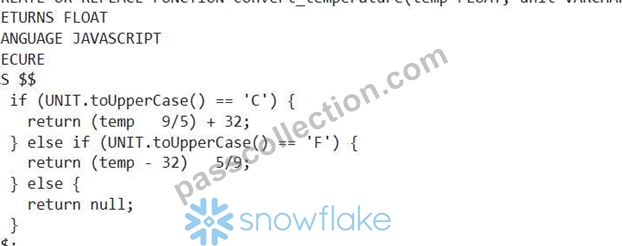
Which statement regarding the UDF's security and behavior is MOST accurate?
- A. The UDF will always return a value, even if the input 'unit is invalid, due to the implicit type conversion in JavaScript.
- B. The 'SECURE' keyword ensures that the UDF's code is completely hidden from all users, including those with the ACCOUNTADMIN role.
- C. The UDF is vulnerable to SQL injection because the 'unit' parameter is not validated against a predefined list of acceptable values.
- D. While the ' SECURE keyword hides the UDF's source code from users without sufficient privileges, users with the ACCOUNTADMIN role can still view the source code.
- E. The UDF is not vulnerable to SQL injection because Javascript UDFs in Snowflake are sandboxed and prevent direct SQL execution.
Answer: E
Explanation:
JavaScript UDFs in Snowflake are sandboxed, preventing SQL injection vulnerabilities. The SECURE keyword hides the UDF definition from users without appropriate privileges, but not from users with sufficient privileges like ACCOUNTADMIN. The UDF explicitly returns NULL for invalid unit values.
NEW QUESTION # 109
You are the provider of a data product on the Snowflake Marketplace. You need to grant a trial access to a potential consumer You want to provide limited access for 7 days to specific tables in your database. Which of the following steps are REQUIRED to accomplish this?
(Select all that apply)
- A. Monitor the consumer's query history to ensure they are only accessing the allowed tables.
- B. Contact Snowflake support to enable trial access for the consumer's account.
- C. Grant OWNERSHIP on the specific tables to the consumer's account temporarily.
- D. Create a new share specifically for the trial consumer, granting USAGE privilege on the database and SELECT privilege on the specific tables.
- E. Create a new role, grant USAGE privilege on the database and SELECT privilege on the specific tables to this role, and then grant this role to the trial consumer.
Answer: D
Explanation:
Option A is correct. You need to create a specific share granting the required privileges (USAGE on the database and SELECT on the tables) to the consumer's account. Option B suggests creating a role and granting it to the consumer; while possible, it's not the direct method using shares for Marketplace access. Option C is a monitoring task, not a setup step. Option D is incorrect; this can be done directly in Snowflake. Option E is incorrect; OWNERSHIP should not be granted temporarily as it gives full control over the object.
NEW QUESTION # 110
You need to create a development environment from a production schema called 'PRODUCTION SCHEMA. You decide to clone the schema'. Which of the following statements are correct regarding the impact of cloning a schema in Snowflake? (Select all that apply)
- A. External tables are also cloned when cloning a schema, but the underlying data files in cloud storage are not duplicated.
- B. Sequences in the cloned schema will continue from where they left off in the original 'PRODUCTION SCHEMA' if no operations are performed on sequence object, if the sequence is updated after cloning then these sequences are fully independent.
- C. All tables, views, and user-defined functions (UDFs) within the 'PRODUCTION_SCHEMX will be cloned to the new development schema.
- D. Cloned schemas consume twice the storage as the source schema immediately after cloning as the underlying data is duplicated.
- E. Cloning a schema automatically clones all tasks and streams associated with tables in the schema but only if the clone is executed at the Database Level.
Answer: A,B,C
Explanation:
Cloning a schema clones all objects within it (tables, views, UDFs, etc.). Cloning uses metadata cloning initially, so it doesn't immediately duplicate the data. Sequences resume from where they left off (if not used cloned schema). Tasks and streams are not cloned when cloning a schema, unless the clone is done at the database level. External tables are cloned, but the data files remain in their original cloud storage location.
NEW QUESTION # 111
A data engineering team is implementing a change data capture (CDC) process using Snowflake Streams on a table 'CUSTOMER DATA'. After several days, they observe that some records are missing from the target table after the stream is consumed. The stream 'CUSTOMER DATA STREAM' is defined as follows: 'CREATE STREAM CUSTOMER DATA STREAM ON TABLE CUSTOMER DATA;' and the transformation code to process the data is shown below. What could be the possible reasons for the missing records, considering the interaction between Time Travel and Streams? Assume all table sizes are significantly larger than micro-partitions, making full table scans inefficient.
- A. The stream's 'AT' or 'BEFORE clause in the consumer query is incorrectly configured, causing it to skip some historical changes.
- B. DML operations (e.g., DELETE, UPDATE) performed directly against the target table are interfering with the stream's ability to track changes consistently.
- C. The parameter for the database containing 'CUSTOMER_DATR is set to a value lower than the stream's offset persistence, causing some changes to be purged before the stream could consume them.
- D. The underlying table 'CUSTOMER DATA' was dropped and recreated with the same name, invalidating the stream's tracking capabilities.
- E. The stream's offset persistence is reliant on Time Travel, If the data being ingested is older than the set Time Travel duration, the change may not be seen by the stream.
Answer: C,E
Explanation:
Option A is correct: If the 'DATA RETENTION_TIME IN DAYS' is less than the time it takes to consume the stream, Time Travel will not be able to retrieve the changes, leading to missing records. Option E is also correct, as time travel duration plays a significant role.
NEW QUESTION # 112
You are developing a JavaScript stored procedure in Snowflake using Snowpark to perform a complex data transformation. This transformation involves multiple steps: filtering, joining with another table, and aggregating data'. You need to ensure that the stored procedure is resilient to failures and can be easily debugged. Which of the following practices would contribute to the robustness and debuggability of your stored procedure? (Select all that apply)
- A. Using Snowpark's logging capabilities to record intermediate results and error messages at various stages of the transformation.
- B. Breaking down the complex transformation into smaller, modular functions within the stored procedure and testing each function independently.
- C. Relying solely on try-catch blocks within the stored procedure to handle all potential exceptions.
- D. Passing the 'snowflake' binding as an argument to each modular function to facilitate logging and SQL execution within those functions.
- E. Directly manipulating the Snowflake metadata (e.g., table schemas) within the stored procedure for dynamic schema evolution.
Answer: A,B,D
Explanation:
Options B, C, and D are correct. Logging intermediate results allows you to track the flow of data and identify the point of failure. Modularizing the code and testing individual functions makes debugging easier. Passing the 'snowflake' binding allows each module to log and execute SQL. Option A is insufficient, complex error requires more granular logging. Option E is dangerous and should be avoided as metadata changes should ideally be performed outside of transformation stored procedure and should be managed by orchestration tools.
NEW QUESTION # 113
You are tasked with building a robust data quality monitoring system for a Snowflake data pipeline. The pipeline processes customer order data and loads it into a 'CUSTOMER ORDERS table. You need to implement checks to ensure that certain critical columns (e.g., 'ORDER ID, 'CUSTOMER ID', 'ORDER DATE, meet specific data quality requirements (e.g., not null, valid format, within acceptable range). You want to design a flexible and scalable solution that allows you to easily add, modify, and monitor data quality rules. Select the options to implement that and scale efficiently Assume there is a central Data Quality table for each metrics
- A. Build a set of custom Snowflake Native Apps to monitor and report on data quality. Each App will focus on one or more critical tables or data quality checks
- B. Develop a parameterized stored procedure that accepts the table name, column name, data quality rule definition, and threshold values as input parameters. This procedure then dynamically constructs and executes the SQL query to check the data quality rule.
- C. Utilize Snowflake's native Data Governance features, such as data masking and row-level security, to enforce data quality rules.
- D. Implement a Snowpark Python UDF that leverages a data quality library (e.g., Great Expectations) to define and execute data quality rules. The UDF takes a DataFrame representing the data to be checked and returns a DataFrame containing the data quality check results.
- E. Create a series of individual SQL scripts, each checking a specific data quality rule for a specific column, and schedule these scripts to run using Snowflake tasks.
Answer: B,D
Explanation:
Options B and C represent the best approaches for a flexible and scalable data quality monitoring system. Option B, using a parameterized stored procedure, allows for dynamic rule execution and easy modification of rules. Option C, using a Snowpark Python UDF with a data quality library, provides a more structured and maintainable way to define and execute complex data quality checks, while also taking advantage of Python's rich ecosystem for data manipulation and analysis. Option A is less scalable and harder to maintain. Option D focuses on data security and access control rather than data quality. Option E will be too complex to maintain a large number of tables and checks.
NEW QUESTION # 114
A data pipeline ingests clickstream data from various sources into a raw Snowflake table CRAW CLICKS). A transformation job then processes this data and loads it into a more structured 'CLICK EVENTS table, performing filtering, cleaning, and data enrichment. The data engineering team notices significant performance bottlenecks during this transformation process, leading to data freshness issues.
The team wants to optimize this process, considering the following:
- A. Create a materialized view on top of 'RAW CLICKS' that pre-computes the necessary transformations and aggregations, allowing the 'CLICK EVENTS' table to be populated directly from the materialized view.
- B. Implement a change data capture (CDC) mechanism on the source systems to only ingest changed data into 'RAW CLICKS, reducing the overall data volume and the amount of data processed by the transformation job.
- C. Use a larger virtual warehouse for the transformation job and partition the 'RAW CLICKS table on the ingestion timestamp to improve data pruning and reduce the amount of data processed during the transformation.
- D. Replace the transformation job with a series of smaller, more specialized jobs, each running on a separate virtual warehouse optimized for the specific task, and orchestrate these jobs using a data pipeline tool.
- E. Optimize the transformation queries by identifying and rewriting inefficient SQL patterns, ensuring appropriate use of joins, filtering conditions, and data type conversions.
Answer: A,B,E
Explanation:
Implementing CDC reduces the amount of data processed. Materialized views pre-compute results, avoiding repeated transformations. Optimizing SQL queries improves the efficiency of the transformation logic. Using a larger warehouse helps, but doesn't address the fundamental issue of processing unnecessary data. Breaking the transformation job into smaller jobs may add overhead and complexity without a clear performance benefit. Partitioning is a database term and clustering is snowflake, the question relates to snowflake.
NEW QUESTION # 115
Consider a scenario where you're optimizing a data pipeline in Snowflake responsible for aggregating sales data from multiple regions. You've identified that the frequent full refreshes of the target aggregated table are causing significant performance overhead and resource consumption. Which strategies could be employed to optimize these full refreshes without sacrificing data accuracy?
- A. Leverage Snowflake's search optimization service on the base tables. While costly, this will dramatically speed up full table scans performed in the aggregation.
- B. Schedule the full refreshes during off-peak hours when the Snowflake warehouse is less utilized. This minimizes the impact on other workloads but does not reduce the actual processing time.
- C. Implement incremental data loading using streams and tasks. This allows you to only process and load the changes that have occurred since the last refresh, reducing the amount of data that needs to be processed.
- D. Replace the full refresh with a 'TRUNCATE TABLE' followed by an 'INSERT statement. This approach is faster than 'CREATE OR REPLACE TABLE' and reduces locking.
- E. Utilize Snowflake's Time Travel feature to clone the previous version of the aggregated table, apply the necessary changes to the clone, and then swap the clone with the original table using 'ALTER TABLE SWAP WITH'. Note that this will impact data availability during the swap operation.
Answer: C,E
Explanation:
Options A and C are the most effective strategies. Incremental data loading (Option A) focuses on processing only the changed data, significantly reducing the processing time and resources used. Cloning and swapping (Option C) can provide a faster refresh while maintaining data availability (with a brief interruption during the swap). Option B, while faster than 'CREATE OR REPLACE TABLE, is still a full refresh and inefficient. Option D only mitigates the impact, not the underlying inefficiency. Option E will help improve performance but can be costly, should only be implemented for specific columns/tables and does not reduce the need for optimizing the data pipeline's refresh strategy directly.
NEW QUESTION # 116
You are setting up a Kafka connector to load data from a Kafka topic into a Snowflake table. You want to use Snowflake's automatic schema evolution feature to handle potential schema changes in the Kafka topic. Which of the following is the correct approach to enable and configure automatic schema evolution using the Kafka Connector for Snowflake?
- A. Set the 'value.converter.schemas.enable' to 'true' and provide Avro schemas and also, configure the Snowflake table with appropriate data types for each field. Schema Evolution is not supported by the Kafka Connector for Snowflake.
- B. Set the property to 'true' and the 'snowflake.ingest.stage' to an existing stage.
- C. Set 'snowflake.ingest.file.name' to an existing file in a stage.
- D. Set the 'snowflake.data.field.name' property to the name of the column in the Snowflake table where the JSON data will be stored as a VARIANT, and set 'snowflake.enable.schematization' to 'true'.
- E. Automatic schema evolution is not directly supported by the Kafka Connector for Snowflake. You must manually manage schema changes in Snowflake.
Answer: E
Explanation:
The correct answer is E. Currently, the Snowflake Kafka connector does not directly support automatic schema evolution. You cannot configure the connector to automatically alter the Snowflake table schema based on changes in the Kafka topic's data structure. You must manually manage schema changes in the Snowflake table to align with the structure of the data being ingested from Kafka. Option D will simply throw errors as the configuration needed is not fully complete with data types. The connector does rely heavily on the VARIANT column and would not be able to evolve properly, and so, that function is not directly available.
NEW QUESTION # 117
A data engineering team is implementing column-level security on a Snowflake table named 'CUSTOMER DATA containing sensitive PII. They want to mask the 'EMAIL' column for users in the 'ANALYST role but allow users in the 'DATA SCIENTIST role to view the unmasked email addresses. The 'ANALYST role already has SELECT privileges on the table. Which of the following steps are necessary to achieve this using a masking policy?
- A. Create a masking policy that uses the IS_ROLE_IN_SESSION('ANALYST') function to return a masked value if the analyst role is active in current session and the original value otherwise.
- B. Create a masking policy with a CASE statement that checks the CURRENT ROLE() function to see if it's 'ANALYST'. If true, mask the email; otherwise, return the original email.
- C. Create a masking policy that uses the CURRENT ROLE() function to return a masked value if the current role is 'ANALYST and the original value otherwise.
- D. Create a dedicated view on 'CUSTOMER DATA' for analysts with the 'EMAIL' column masked using a CASE statement within the view's SELECT statement. Grant SELECT privilege to the ANALYST role on the view only.
- E. Create a masking policy that uses the CURRENT_USER() function to check if the current user belongs to the 'ANALYST' role.
Answer: B,C
Explanation:
Options A and D are correct. They both use the 'CURRENT ROLE()' function within the masking policy to conditionally mask the email addresses based on the active role. Option B uses which checks if a role has been granted to the user which is not the intention. CURRENT_USER is not appropriate because the requirement is role-based. Creating a view (option E) is a valid but less scalable and maintainable solution compared to a masking policy. Creating a view will require more maintenance than creating a policy which is more integrated and scalable.
NEW QUESTION # 118
A data engineer is tasked with migrating data from a large on-premise Hadoop cluster to Snowflake using Spark. The Hadoop cluster contains nested JSON dat a. To optimize performance and minimize data transformation in Spark, what is the most efficient approach to read the JSON data into a Spark DataFrame and write it directly to a Snowflake table?
- A. Read the JSON data as strings and utilize Snowflake's 'PARSE JSON' function within a Spark SQL query to transform and load the data into a variant column in Snowflake.
- B. Read the JSON data as text files, then use Spark to parse and flatten the JSON structure before writing to Snowflake using the Snowflake JDBC connector.
- C. Use the 'STORAGE_INTEGRATION' feature in Snowflake to directly access the JSON files in Hadoop (via an external stage) and load the data without using Spark at all.
- D. Use the Snowflake Spark connector with the 'inferSchema' option set to 'true' when reading the JSON data. This allows Spark to automatically infer the schema and write directly to Snowflake.
- E. Define a schema manually in Spark, then read the JSON data into a Spark DataFrame. Use the Snowflake Spark connector to write the data to Snowflake, specifying the schema explicitly.
Answer: E
Explanation:
Defining a schema manually in Spark provides the most control over the data types and avoids potential schema inference issues. While Snowflake can parse JSON directly (option E and D), using Spark allows for potential transformations and data cleaning before loading. Option B's 'inferSchema' can be slow and may not accurately represent complex nested structures. Option A forces unnecessary string parsing in Spark, and direct access via STORAGE INTEGRATION bypasses the request to use spark connectors.
NEW QUESTION # 119
......
Verified DEA-C02 dumps Q&As - 2026 Latest DEA-C02 Download: https://www.passcollection.com/DEA-C02_real-exams.html
Dumps Questions [2026] Pass for DEA-C02 Exam: https://drive.google.com/open?id=1ucqFHtzlWy10_STs9pf4zI8wq14oFXRk
